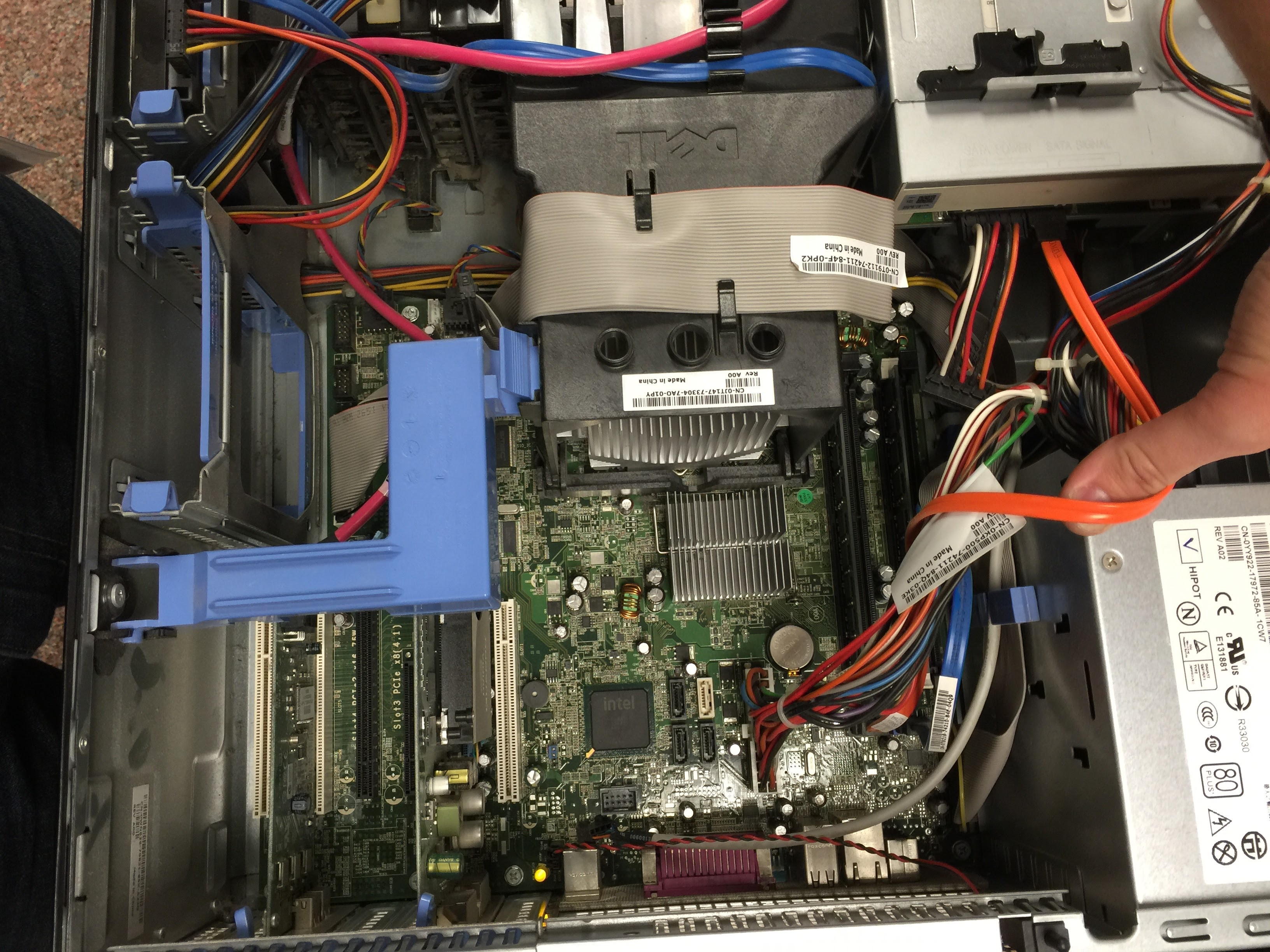
The Role of Motherboards in Gaming PCs
If you want a gaming PC that behaves the same way on day 1 and day 300, the motherboard is where the discipline starts. It is easy to obsess over the graphics card, the monitor, or the case lighting. The motherboard is less glamorous. It is also the board that decides whether the rest of the machine fits, talks, cools, and upgrades without drama.
When I look at a gaming build, I ask four questions before I ask about frame rates: Will the board accept the CPU I want? Will it give the graphics card enough room to breathe? Will the memory, storage, and ports match the job? Will the system keep its stability when the CPU and GPU are under load? Those are not side issues. They are the plumbing of a good gaming PC. For a simple reference on what a motherboard is, and how form factor and expansion standards shape the design, the background on motherboards, ATX, and PCI Express is a useful starting point.
The practical problem is simple: a gaming PC can be expensive, and small compatibility mistakes are the ones that waste time and money. A board with the wrong socket, weak power delivery, limited memory support, or poor layout can turn an otherwise strong parts list into a noisy, cramped, or unstable machine. If you want the broader site overview, start at the home page or the blog index.
By the end of this guide, you will know what a motherboard actually does, which features matter most for gaming, how to check compatibility, and how much performance a board can really influence. I will also keep the logic practical: what helps, what only looks impressive, and what to ignore unless you have a clear reason to pay for it.
What a Motherboard Is
The motherboard is the main circuit board that connects the CPU, RAM, storage drives, graphics card, power delivery, and front-panel devices into one system. In other words, it is the central meeting point for the parts that matter most. A gaming PC can still boot with an uninspiring motherboard, but the board controls how smoothly the machine is assembled, how stable it runs, and how easy it is to expand later.
That is why people who build or buy gaming systems should not treat the board as an afterthought. It is not just a place to plug things in. It defines the socket that the CPU must use, the memory standard the system accepts, the number of fast storage devices you can install, and the expansion slots available for a capture card, sound card, or additional networking hardware.
In a strict sense, a motherboard does not “create” performance the way a faster GPU or CPU can. Its job is closer to command and control. It determines whether the high-performance parts can operate at their intended settings without being boxed in by power limits, weak cooling support, or a cramped layout. That is why the board matters even when the frame rate seems to be driven by other components.
Motherboard terminology, in plain English
| Term | What it means | Why a gamer should care |
|---|---|---|
| Socket | The physical and electrical fit for the CPU | If the socket is wrong, the processor will not work at all |
| Chipset | The platform controller set that manages board features | It affects USB, storage lanes, overclocking support, and upgrade options |
| VRM | Voltage regulator module that feeds the CPU clean power | Strong VRMs help the CPU hold boost clocks more consistently |
| PCIe | The expansion lane standard used by the GPU and other cards | It determines how add-in devices connect and how much bandwidth they get |
| DIMM slots | Slots for system memory | They decide capacity, speed support, and whether you can run dual-channel memory |
| Form factor | The board size and mounting pattern | It has to fit the case and still leave room for cables, coolers, and airflow |
| UEFI/BIOS | The firmware used to configure and start the system | It affects setup, compatibility, fan control, and feature updates |
Once those terms are clear, the rest of the article becomes easier to read. Most motherboard buying mistakes come from ignoring one of those lines in the table. That is usually where the trouble starts, and it is rarely expensive to avoid if you check early.
Key Features to Consider
If I had to reduce motherboard selection to a short checklist, I would put the following items at the top. These are the features that have real consequences in a gaming build. Some make the board a better long-term platform. Others prevent the kind of problem that only appears after the parts are already on the desk.
| Feature | What to check | Why it matters |
|---|---|---|
| CPU socket | Matches the exact processor family | Compatibility is non-negotiable |
| Chipset | Overclocking support, lane count, USB, storage options | It shapes the board’s flexibility |
| Power delivery | VRM quality, heatsinks, and board cooling | Stable power means stable boost behavior |
| Memory support | DDR generation, speed ratings, capacity, slot count | It affects capacity and bandwidth headroom |
| Expansion slots | PCIe slot count and spacing | It determines GPU fit and future add-ons |
| Storage support | M.2 slots, SATA ports, heatsinks | It affects SSD count and installation ease |
| Networking | Ethernet speed, Wi-Fi, Bluetooth | It changes how the PC connects to the rest of the house |
| Rear I/O | USB mix, audio, video outputs, clear CMOS access | It determines day-to-day convenience |
| Form factor | ATX, microATX, or Mini-ITX fit | It affects space, airflow, and expansion room |
1. Socket and chipset
The socket is the hard gatekeeper. If the CPU and socket do not match, the rest of the decision is irrelevant. That sounds obvious, yet socket confusion is still one of the fastest ways to derail a build. The chipset sits behind that decision and adds nuance: one board may support the same processor family as another, but offer more USB ports, more storage lanes, better fan control, or overclocking support.
For gaming, chipset choice matters more when you want to push the platform rather than just run it. If you plan to set memory profiles, tune CPU limits, or expand storage over time, the chipset is part of the cost of doing that well. It is not about bragging rights. It is about not painting yourself into a corner.
2. VRM quality and cooling
VRMs are the power circuits that feed the CPU. In a gaming machine, especially one with a strong CPU or aggressive boost behavior, the board must deliver power cleanly and consistently. Better VRM design usually means better heatsinks, less thermal stress, and a lower chance that the board becomes the bottleneck when the processor is working hard.
This is one of the easiest areas to misunderstand because the details are not always visible. A board can look premium from the outside and still have modest power delivery underneath. If the goal is a midrange gaming build, that may still be fine. If the goal is a higher-end CPU that you want to keep under load for long sessions, this is not a corner to ignore.
3. Memory support
Memory support is about more than slot count. You should check the DDR generation, the maximum capacity, the rated speeds, and whether the board supports the amount of RAM you actually plan to install. For gaming, 16 GB is still a baseline many people live with, but modern titles, background apps, browsers, and voice chat can make 32 GB a practical choice.
Speed also matters, but not in the simple “higher number equals better game” sense. The board must support the kit properly, and the CPU architecture must benefit from it. In a healthy build, memory runs at a stable profile, the system boots every time, and you do not spend your evening chasing random instability because the board and the memory kit were not happy together.
4. Expansion and storage
A gaming PC usually starts with one graphics card, one boot drive, and maybe one extra SSD. It often ends with more. A board with enough PCIe slots and multiple M.2 or SATA connections gives you room to grow without replacing the entire platform. That is especially useful if you want a capture card, a second NVMe drive, a high-speed network card, or extra storage for large game libraries.
Slot placement also matters. A second slot might exist on paper but be blocked by a thick GPU cooler in practice. M.2 slots may be shared with SATA ports. Some boards are generous; some are compact and practical. Read the lane map before you buy, not after the box arrives.
5. Networking and rear I/O
Most people do not shop for a motherboard because of its rear USB cluster. They should still check it. Gaming setups accumulate devices: keyboard, mouse, headset, microphone, controller dock, external storage, capture gear, and sometimes a DAC or interface. The board’s rear I/O should cover that without forcing you into a hub maze.
Networking is similar. A board with reliable Ethernet is usually the baseline. Wi-Fi and Bluetooth are useful if the PC will not live near a router or if you use wireless peripherals. None of this raises frame rate directly, but it changes how cleanly the system fits into the room it actually lives in.
Compatibility with Components
Compatibility is the part that saves you from expensive mistakes. The best motherboard on paper is the wrong board if it does not match the CPU, case, memory, or graphics card you already picked. I treat compatibility as a sequence of gates. Pass them in order, and the build stays calm. Skip them, and the failure mode is predictable.
Compatibility checklist
- CPU first: confirm the socket and supported processor generation.
- Memory next: match DDR generation, capacity, and the number of sticks you want to run.
- Case fit: confirm the board size against the case’s supported form factors.
- GPU clearance: check slot spacing and whether a large card will block headers or drive bays.
- Storage plan: confirm the number of M.2 and SATA devices you intend to use.
- Power budget: make sure the power supply, CPU connector, and GPU connector arrangement are sufficient.
- Cooling path: confirm the board layout will not fight the CPU cooler or front fan wiring.
That sequence is boring in the same way seatbelts are boring. It prevents the mess. A board that matches the case and the CPU, but blocks a long graphics card or forces you to give up an SSD slot, is not a clean choice. A build should not require compromise by accident.
Form factor: ATX, microATX, and Mini-ITX
The form factor is one of the easiest ways to frame the board choice. ATX is the familiar full-size option with more room for expansion. microATX is smaller and often more affordable, while still offering enough slots for many gaming builds. Mini-ITX is compact and can look excellent in a small case, but it asks you to accept fewer slots and tighter thermal margins.
There is no universal winner. A large case and a board with more slots are useful if you plan to upgrade often. A smaller board is sensible if the system will live on a desk, travel to events, or simply needs a clean compact footprint. The right answer is the one that matches the build’s real use, not the spec sheet’s loudest number.
CPU and BIOS support
Board compatibility is not always just about physical fit. Sometimes the board technically supports the processor family, but needs the correct BIOS version before it will boot that CPU properly. That is one reason I value boards that make firmware updates and compatibility notes clear. A system should not turn into a detective story before the first power-on.
BIOS or UEFI support also matters later. Updates may improve memory compatibility, fan control, or device recognition. In a gaming PC, that can mean the difference between a machine that is merely assembled and one that is actually settled.
GPU fit and lane layout
The graphics card is the part most gamers can point to from across the room. The motherboard still influences how it lives in the case. A thick GPU can cover headers, crowd storage slots, or make cable routing harder. Some boards place the primary x16 slot in a way that leaves better breathing room; others do not. That is not a theoretical problem. It becomes visible the moment you try to close the side panel.
PCIe generation also deserves attention. Modern boards and cards are designed with backward and forward compatibility in mind, but the available lane layout still affects how secondary devices share bandwidth. If you use multiple fast drives or expansion cards, the board’s lane map is part of the performance story. The PCI Express standard exists to move data quickly, but the board decides how many lanes each device actually gets.
Memory kits and QVL lists
If you want fewer surprises, check the board’s qualified vendor list, often called the QVL. That is the list of memory kits the manufacturer has tested or validated. It is not a magic approval stamp, but it does reduce uncertainty. For a gaming PC, this matters because unstable memory can look like random game crashes, driver problems, or odd boot behavior when the real issue is deeper in the platform.
I do not treat the QVL as a prison. I treat it as a floor. A good kit on the list is usually a safe place to start. A kit outside the list may still work, but it asks you to do more homework. That is a fair trade only if you know why you are taking it.
Impact on Performance
Here is the honest version: the motherboard usually does not create dramatic frame-rate gains by itself. That job belongs mostly to the CPU and graphics card. What the motherboard does is protect or limit the performance those parts can deliver. It shapes whether the processor can hold boost clocks, whether the memory runs at the intended speed, and whether the storage and expansion devices can operate without being crowded.
That sounds subtle because it is. Motherboards are often about preventing loss rather than generating visible gain. In practice, that can be the more important job. A stable board with strong power delivery and sensible layout can keep a gaming system consistent under load. A weak one can introduce throttling, noise, instability, or upgrade limits that only become obvious after the money is already spent.
Where the board influences game experience
- CPU boost behavior: better VRMs and cooling help the processor sustain performance.
- Memory tuning: a board with solid support can run RAM at the intended profile more reliably.
- Storage responsiveness: good M.2 support keeps game installs and loads smooth.
- Thermal stability: layout and heatsinks affect how well the system manages long sessions.
- Upgrade headroom: extra slots and sane lane sharing make future changes less painful.
That list is the reason motherboard reviews matter even when the headline specs seem similar. Two boards can support the same CPU, but one can have better cooling on the VRMs, better fan headers, and better slot spacing. That board is usually the one that gives the rest of the hardware less to worry about.
Performance is often a chain, not a single number
A gaming PC is a chain of dependencies. The CPU prepares the work, the GPU renders it, memory feeds it, storage loads assets, and the motherboard coordinates the whole thing. Break one weak link, and the chain does not fail loudly every time. Sometimes it just becomes less consistent. That is why motherboard quality often shows up in the form of fewer crashes, less tuning frustration, and better long-term upgrade behavior rather than in one heroic benchmark number.
For that reason, I prefer to think about motherboard performance in two buckets: raw support and operational comfort. Raw support is the hardware limit: socket, power delivery, slots, lanes, and firmware. Operational comfort is everything that keeps the system sensible afterward: clear layout, readable BIOS, enough headers, and a form factor that does not fight the case. A good gaming board does both jobs.
Examples of practical trade-offs
Example 1: A midrange gaming build with a modest CPU and one graphics card may do perfectly well on a simpler board. There is no need to buy a board designed for overclocking marathons if the system will run at stock settings and use one SSD. Spending more there buys a nicer spec sheet, not necessarily more fun.
Example 2: A system with a high-wattage CPU, large GPU, several SSDs, and a desire to upgrade later benefits from a board with stronger power delivery and more expansion room. In this case, the motherboard is not a luxury part. It is the platform that keeps the rest of the investment from aging badly.
Example 3: A compact small-form-factor build can be excellent for gaming, but the motherboard has to be chosen with more care. Tight spacing, shared lanes, and thermal limits are easier to hit in a smaller case. The board’s layout becomes part of the cooling plan, not just the parts list.
Where a well-chosen board saves time
In real life, the best motherboard feature is often the one that prevents a support problem. A board with a clear BIOS interface saves setup time. A board with labeled fan headers saves cable confusion. A board with enough rear USB ports saves adapters. A board with better documentation saves guesswork. None of that is flashy, and all of it matters the moment you need the PC to work now rather than after a round of troubleshooting.
For hardware publishers and communities that keep build notes, part lists, and support requests in separate systems, AI integration services can help connect that workflow to existing tools without forcing the process to start over. That does not change the motherboard story, but it can make the surrounding operations less messy.
What I Would Prioritize First
If I had to rank the motherboard decision for a gaming PC, I would use a simple order. This keeps the buying process honest and avoids paying for features in the wrong sequence.
- Compatibility first: socket, chipset, form factor, and memory generation.
- Power delivery second: VRM quality and heatsinking that match the CPU.
- Expansion third: enough PCIe and storage support for your actual use.
- Convenience fourth: rear I/O, onboard buttons, fan headers, and Wi-Fi.
- Future headroom last: buy enough board for the next upgrade cycle, not the next decade.
That order is useful because it keeps the build anchored to the parts that matter most. People often start with convenience or aesthetics. I would rather they start with fit and stability. A clean-looking board that cannot feed the CPU properly is not a clean build. It is just a more expensive problem.
Conclusion
The motherboard is the part of a gaming PC that decides whether the rest of the machine can do its job without friction. It does not usually win the benchmark screenshot, but it controls fit, power, expansion, memory support, storage support, and the long-term shape of the build. If the CPU is the engine and the GPU is the performer, the motherboard is the road, the lane markings, and the traffic control all at once.
My rule is simple: check compatibility first, then power delivery, then expansion room, then convenience. If you do that, the motherboard stops being a confusing box of chipset names and becomes what it should be: the foundation of a stable gaming system. That is the whole job, and it is a serious one.
If you are planning a build next, I would read this alongside the broader gaming PC building guide and the PC maintenance basics article. One helps you assemble the machine. The other helps you keep the machine from becoming a weekend project.
- Key point: the motherboard sets the compatibility rules.
- Key point: VRMs and layout affect stability more than most buyers expect.
- Key point: expansion room and storage support matter for future upgrades.
- Key point: a good board protects performance; a bad one limits it.
That is the line I would hold. Buy the board that fits the build you actually want, not the one that merely looks impressive in the carton.